 lilora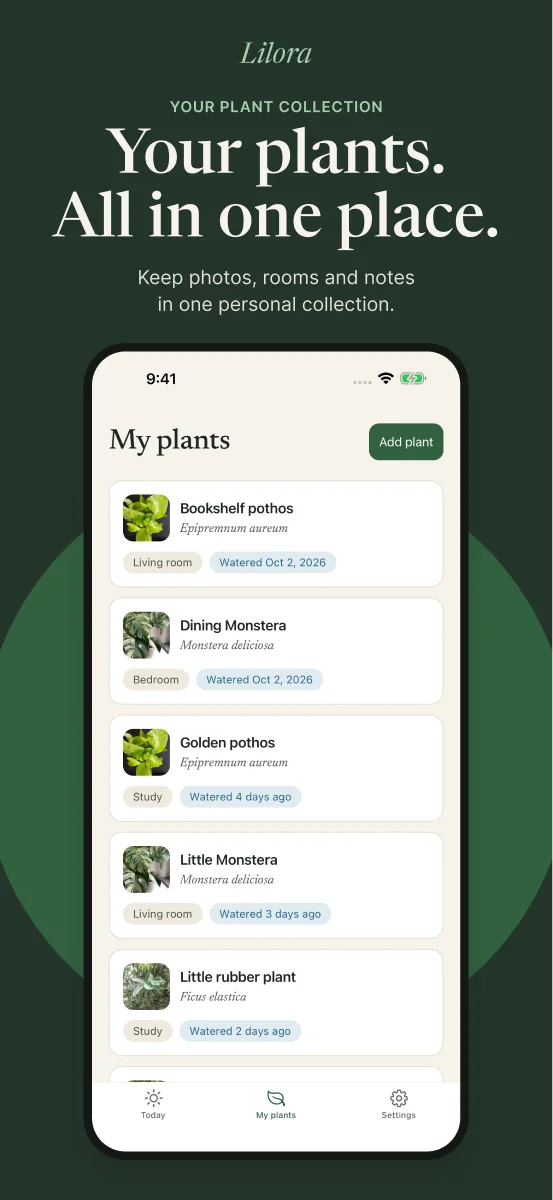
A short answer
Lilora centres on a household plant notebook: keeping plants, photos and care records together. Planta describes a wider care toolkit, including personalized schedules and a light meter. Both describe ways to share plant care. Choose around your daily workflow, rather than the longest feature list.
What this comparison covers
As of 16 October 2026, Lilora is awaiting App Store review. Planta has a public U.S. App Store listing. This article compares documented features; it is not a hands-on performance test. It is published by Lilora, one of the products discussed. Features and offers may change by country, platform and plan. Planta on the App Store
Start with the job you want help doing
Imagine two people looking after the same living-room plant. One checks it before work. The other comes home and wonders whether it needs attention. They need a record of what happened, and a habit of reading it first.
Another owner might want to explore several tools in one app: schedules, identification, light estimates and guidance about a struggling plant. These scenarios lead to different questions when choosing software.
What each app describes
Lilora describes photos, notes and care history, optional Pl@ntNet-powered identification, reminders to check plants and a private household with shared records. Its first-release focus is inventory, care and identification; it does not include a light meter or disease diagnosis. Lilora overview · Lilora support
Planta describes plant organization, a journal, photo identification, personalized care schedules, a light meter and Dr. Planta symptom guidance. It also offers Care Share for family members and plant sitters. Availability depends on the feature and plan. Planta’s official feature overview
Reminders and records answer different questions
A reminder answers “When should I look?” A completed care entry answers “What did I actually do?” Lilora distinguishes a check from watering: after looking at the plant and soil, record watering or a check that needed no water. How Lilora’s checks work
When evaluating any app, open one plant, find its most recent care entry, record today’s actual outcome, and return to the overview. Ask whether you can understand the record without remembering the day yourself. This is a suggested personal test, not a test result for either app.
Shared care deserves a closer look
Lilora’s household model shares plants, photos and care history with members. Planta also supports shared care: its help centre describes premium invitations for family and plant sitters, with different capabilities for each role. Sharing is an overlap, not an exclusive Lilora feature. Lilora support · Planta Help Center
Decide who needs to see the plants, who should change them, and how you will check the latest record. A household member and a friend helping for a weekend may need different access.
Compare the offer you can actually buy
Lilora describes free manual species entry, three initial photo identifications, a pack of 10 and a Plus monthly allowance of 30. Its support page directs readers to Apple for local prices. There is no verified public checkout price to compare while launch is pending. Lilora purchases
Planta’s U.S. listing includes one-month prices of $7.99 and $9.99 and 12-month prices of $35.99 and $47.99. These are listing examples, not a promise of eligibility. Its help centre identifies identification and the light meter among premium features. App Store listing · Free and premium access
Check the total charge, renewal period and included features on your purchase screen. Do not confuse a monthly-equivalent figure with the amount charged upfront. Planta explains that the subscription period is billed in advance. Subscription billing
Which approach belongs on your shortlist?
- To evaluate a broad care toolkit now, inspect Planta’s current listing and the features available to you.
- If a household notebook, check-first routine and shared record match your needs, explore Lilora’s described workflow while review is pending.
- Write down three essential tasks before comparing paid plans. Give them more weight than features you are unlikely to use.
Common questions
Does Lilora replace Planta’s entire feature set?
No. Lilora’s described first release focuses on plant inventory, shared records, reminders and optional identification. It does not offer the same range of tools.
Can more than one person help care for plants?
Both products describe sharing. Compare actual membership rules and paid-plan requirements before choosing.
Can I download Lilora today?
As of this article’s review date, Lilora is awaiting App Store review. No release date is promised. Explore Lilora’s current product description.
Sources and further reading
- Planta on the App Store
- Lilora overview
- Lilora support
- Planta’s official feature overview
- Planta Help Center
- Free and premium access
- Subscription billing
General guidance, not a diagnosis. Check the needs of your particular species and growing conditions.